Understanding the difference between a conversion goal and a tracked event is key to setting up Pathmonk correctly and optimizing for meaningful results. You can review both by going to Analytics → Events → Overview, where you’ll find two sections:
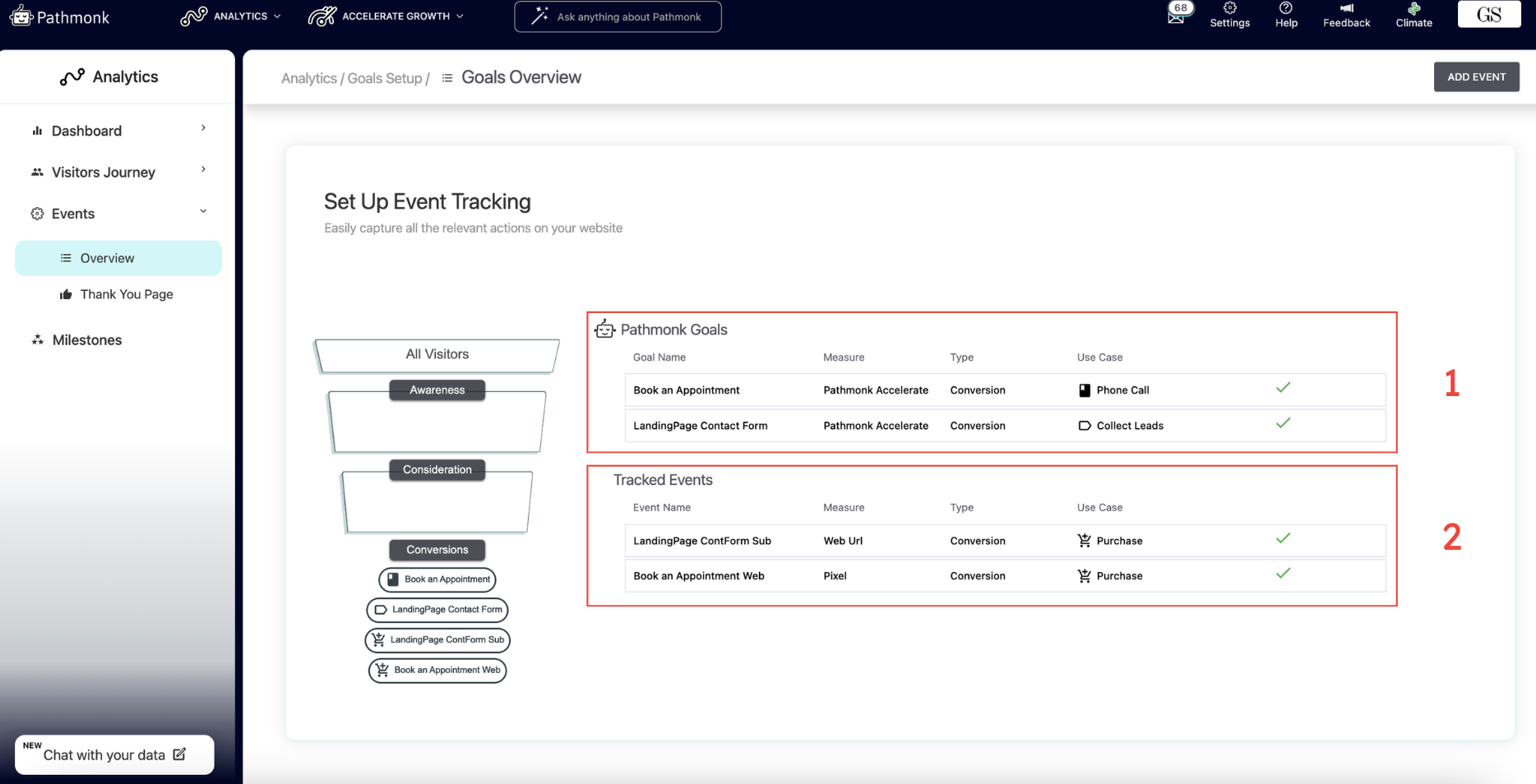
The first box lists your conversion goals.
The second box lists your tracked events.
Keep in mind: you can create as many tracked events as you need, but every conversion goal must be linked to an existing tracked event. Without that connection, Pathmonk won’t be able to measure the goal’s performance.
Conversion goal: what you want to achieve
A conversion goal represents the valuable action you want a visitor to complete, the objective that drives business outcomes. In most business contexts, conversion goals fall into two main categories:
Lead generation: submitted forms, booked meetings, demo requests, free trials, etc.
E-commerce revenue: completing a purchase successfully.
So, for instance, if you're a B2B SaaS, your conversion goal could be getting visitors to sign up for a free trial of the product, therefore Pathmonk will optimize microexperiences for this goal: Start trial.
Learn more:
- What is a conversion goal?
- How to implement a conversion goal?
- How to set up a secondary conversion goal?
Tracked event: how you confirm the action happened
A tracked event is the signal that lets Pathmonk detect that the valuable action actually occurred. It’s how you measure whether a visitor reached your conversion goal.
Continuing the previous example: if users land on a specific URL after signing up for a free trial, you can track visits to that URL as the event that confirms the free-trial conversion.
In short, your tracked event is the proof that the conversion happened.
Learn more:
Why you see a high number of “conversions” in your dashboard
In Pathmonk, both conversion goals and tracked events are counted as conversion points. This is intentional, but it can be confusing if you expect “conversions” to only refer to final outcomes like demo requests or purchases.
Here’s why the system works this way:
A conversion goal indicates strong intent to complete the conversion and help the AI understand who is progressing in the buying journey.
A tracked event confirms that the action actually happened (e.g., form submission success page, checkout confirmation URL). These reflect your true final conversions.
Because the AI needs to learn from all meaningful steps in the journey, Pathmonk counts both goals and events as conversion points. This gives the model visibility into:
How many visitors reached the key point you're optimizing for
How many completed the final action
Where people drop off in between
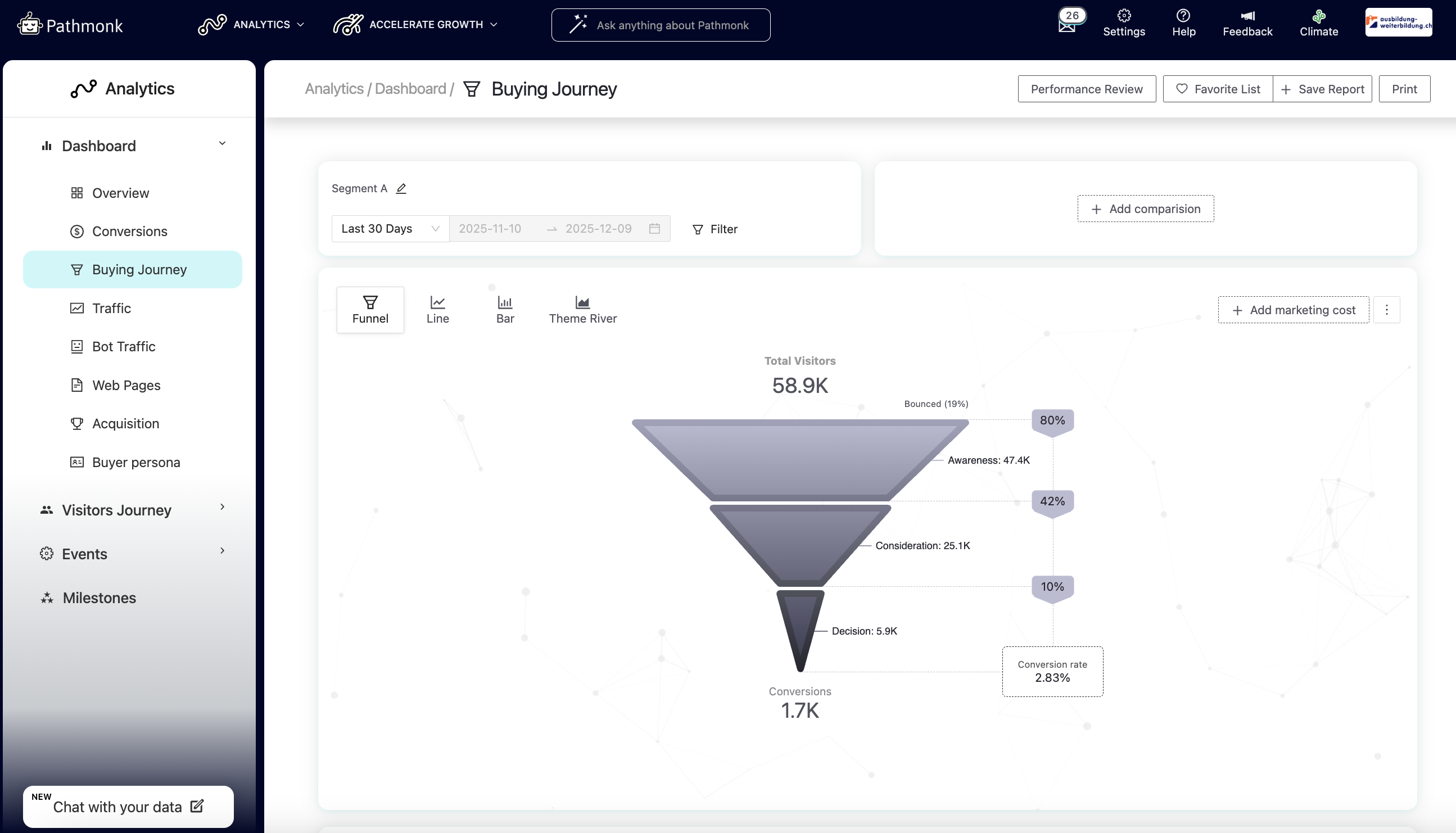
As a result, your dashboard will show a higher number of “conversions” than expected, not because more users completed your final objective, but because Pathmonk is also tracking the pre-conversion actions that the AI uses to optimize performance.
But don't worry, this is not how we're going to report results to you!
Isolating your tracked events to measure real conversions only
To understand your actual conversions — not all goal hits — you can isolate the tracked events that represent the final actions you care about.
Start by going to Analytics → Buying Journey. If no filters are applied, the report will show all conversion points (conversion goals + tracked events), as in the example below:
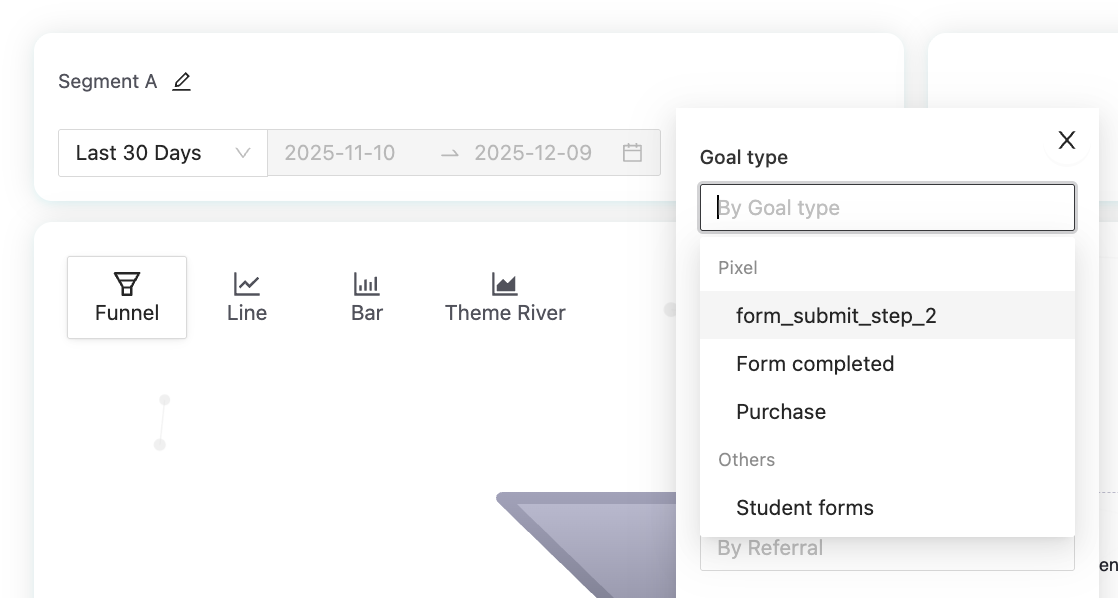
To focus only on real conversions, click Filter and select the tracked event(s) you want to measure. You can choose one or multiple. In this example, the customer wants to analyze completions of Step 2 of their form, so we’ll isolate the corresponding pixel event.
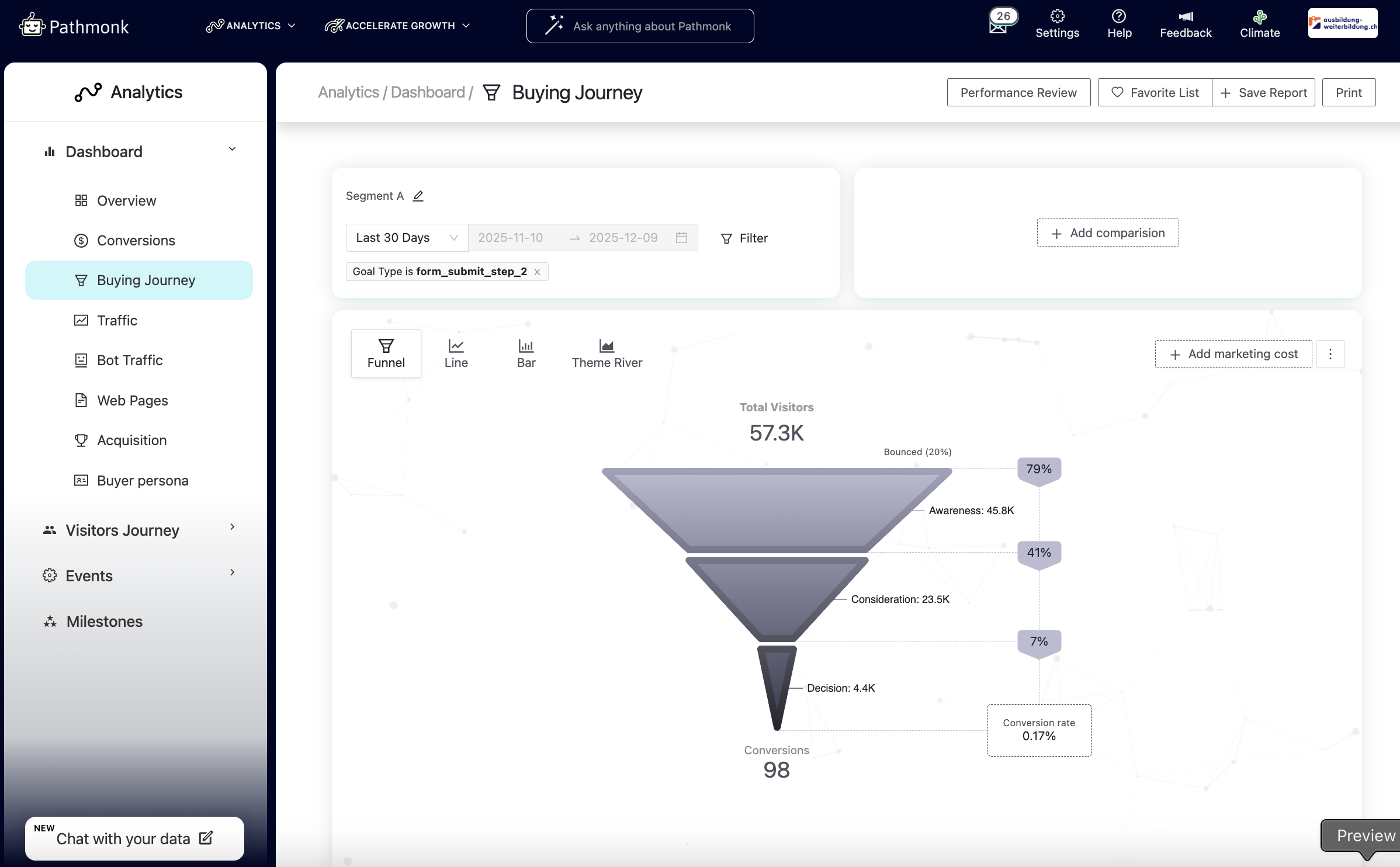
Once the filter is applied, the report updates automatically. In this case, the view goes from 1.7k total conversions to 98 actual conversions tied to that specific event.
Next, you can evaluate Pathmonk’s impact on this specific conversion, not on the broader goal.
In the top-right corner, click Performance review to generate the two-funnel comparison:
Pathmonk-disabled on the left
Pathmonk-enabled on the right
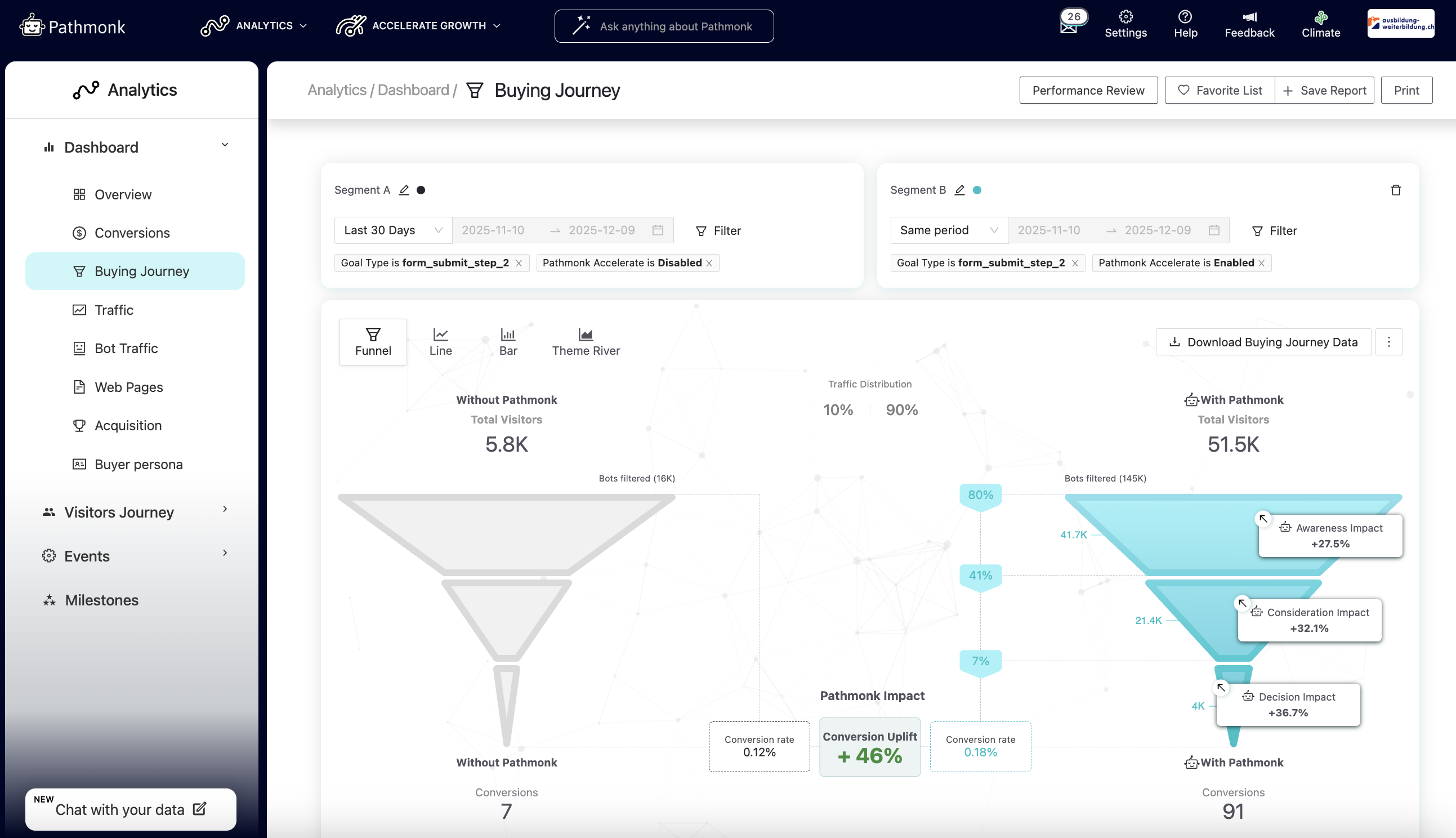
The 46 percent uplift shown represents Pathmonk’s contribution solely to Step 2 of the form, the isolated tracked event, giving you a precise understanding of performance for that action.
Still need help reading your results?
Don't worry, our team is here to help. Get in touch at support@pathmonk.com and we'll review your results together.
Was this article helpful?
That’s Great!
Thank you for your feedback
Sorry! We couldn't be helpful
Thank you for your feedback
Feedback sent
We appreciate your effort and will try to fix the article