Pathmonk lets you control exactly where microexperiences appear on your website. This is useful when you want to show Pathmonk only on relevant pages, avoid overlap with existing elements, or exclude pages that don’t need personalization.
You can choose to:
Show microexperiences on all pages except a few exclusions, or
Show microexperiences only on selected pages
1. Excluding specific pages (most common scenario)
In most cases, customers allow Pathmonk to run across the entire website and simply exclude a few pages wheremicroxperiences aren’t needed.
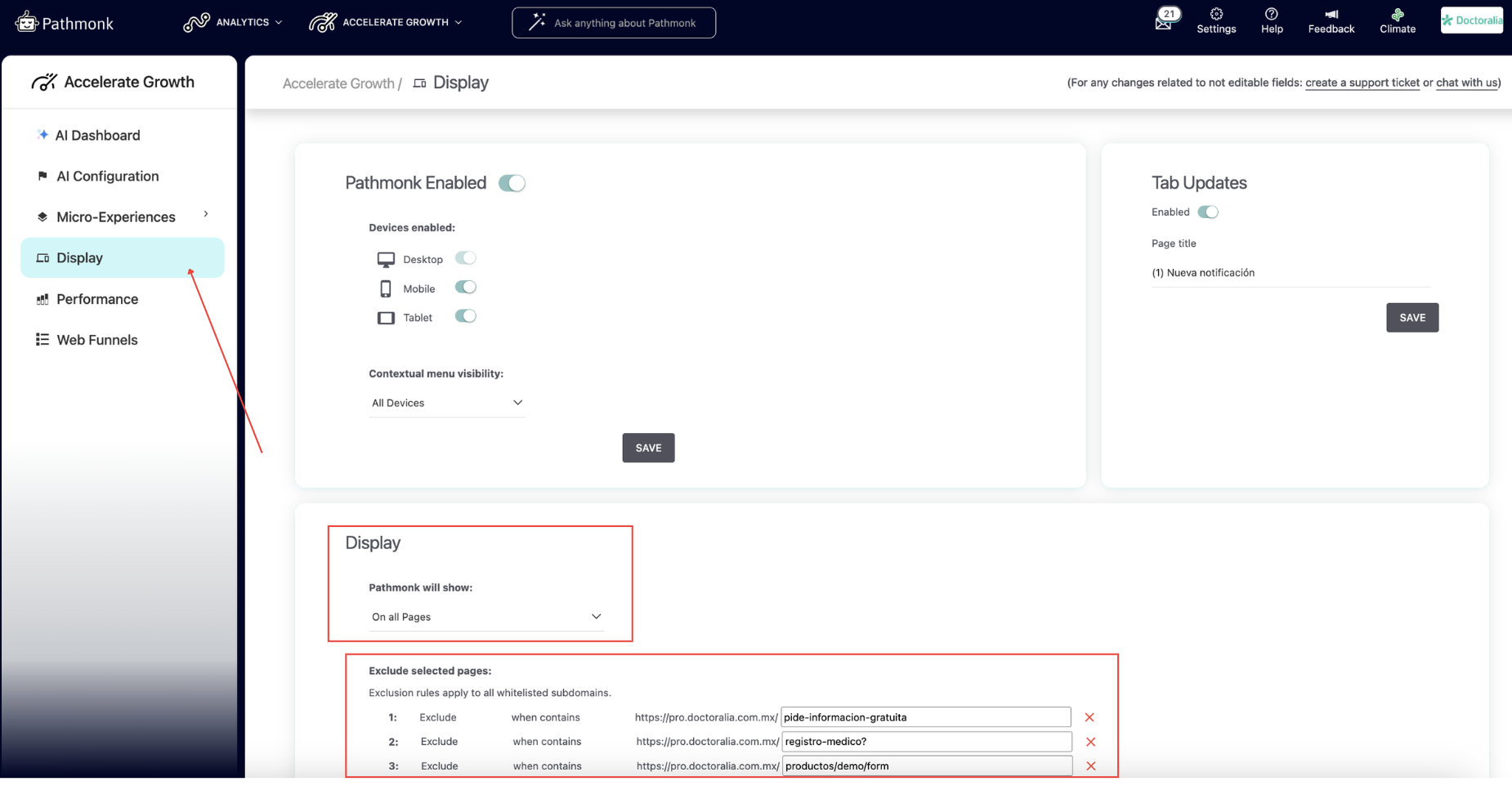
To exclude pages:
Go to Accelerate Growth (top menu)
Navigate to Display
In the lower section of the page, keep 'Pathmonk will show' 'On all pages'.
Add the subpage or path you want to exclude (e.g.,
/thank-you,/careers)Repeat for any additional pages
Click Save
Common pages to exclude:
Careers pages (traffic is not conversion-oriented)
Contact pages (if you prefer users to focus on the form)
Privacy policy and legal pages
Pages with embedded calendars or booking tools
Very high-volume blog posts that attract irrelevant traffic
Excluding these helps maintain a clean user experience without reducing performance in meaningful areas.
2. Showing Pathmonk only on specific pages
If you want Pathmonk to be visible only on a few key pages—e.g., a landing page, a product page, or a pricing page—you can switch to an inclusion-based setup.
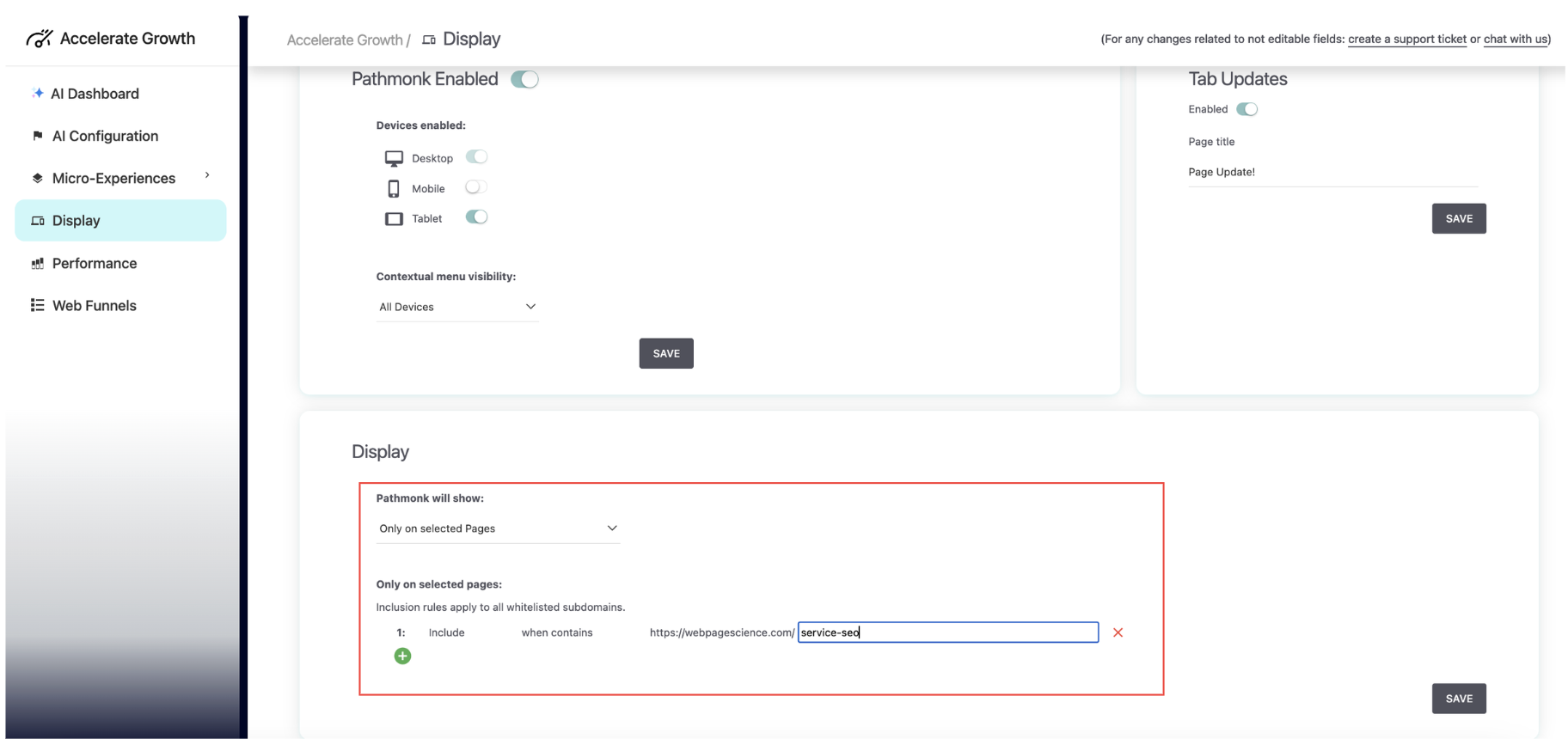
To include specific pages:
Go to Accelerate Growth (top menu)
Navigate to Display
In the lower section of the page, choose 'Pathmonk will show' 'Only on selected pages'.
Add the subpage or path you want to include
Add more pages as needed
Click Save
Pathmonk will appear only on the pages you add.
This setup is useful when:
You’re running a controlled test on a specific funnel
You have strict design constraints
You're using microexperiences only for a particular product or service
You want to start small and expand later
Best practices when deciding what to include or exclude
Choosing where microxperiences appear can have a noticeable impact on performance. Consider the following:
1. Show Pathmonk on as many pages as possible
Generally, broader coverage leads to better results. Pathmonk learns faster with more behavioral data and can support the visitor earlier in the journey.
2. Prioritize pages where visitors need guidance or context
Great pages to include:
Product or service pages
Pricing pages
High-traffic blog posts (use core cards or product-specific cards where relevant)
Comparison or feature pages
Home page, especially for first-time visitors
3. Exclude pages where Pathmonk adds little value
Careers or jobs pages
Legal and policy pages
Basic contact pages
Thank-you pages (these should trigger your tracking goal instead)
4. Think about the visitor journey, not just URLs
Ask: Would a microxperience help a visitor make a better decision here? If yes, leave Pathmonk active.
Still need help with your setup?
Get in touch with our team at support@pathmonk.com and we'll help you get everything ready for success.
Was this article helpful?
That’s Great!
Thank you for your feedback
Sorry! We couldn't be helpful
Thank you for your feedback
Feedback sent
We appreciate your effort and will try to fix the article