During onboarding, or right after going live, it’s very common to test whether your conversions are being tracked correctly. However, many customers look for the test conversion in the wrong place, which can make it seem like Pathmonk isn’t tracking correctly. In most cases, the tracking is working fine, the confusion simply comes from where the test appears in the platform.
When Pathmonk is published, the system starts assigning each new visitor to one of two groups:
Pathmonk Enabled
Pathmonk Disabled
You can learn more about how assignment works in this article explaining our fingerprint technology.
If you visited the site after the snippet was installed but before Pathmonk officially went live, your session was tracked outside of A/B testing. Pathmonk never moves a visitor from one group to another, so you’ll remain unassigned, even if you later convert.
Because of this, any conversion you make during testing won’t show up in the A/B comparison. It’s not lost; it’s simply not eligible for either segment.
You can still find your test conversion in these places:
In the Buying Journey report when the A/B testing view is turned off
In Analytics → Visitors journey → Conversions, where it will appear as No group defined
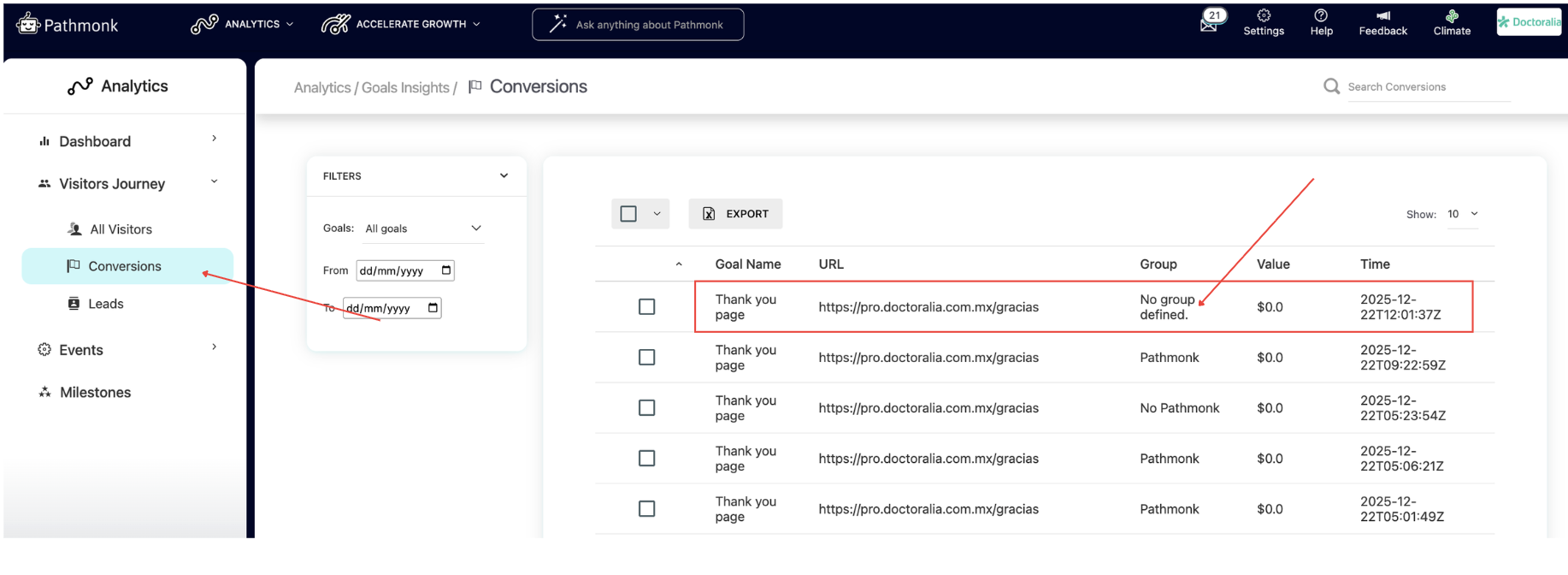
This is expected behavior and applies to any visitor who was recorded before the experiment officially started.
Still having trouble identifying your conversions?
If your tracking isn’t set up correctly, or if your website has a more complex environment, there may be another factor affecting your results. If you’ve checked the points above and your test conversions still aren’t showing where you expect, reach out to us at support@pathmonk.com. We’ll take a look and help you identify what might be causing the issue.
Was this article helpful?
That’s Great!
Thank you for your feedback
Sorry! We couldn't be helpful
Thank you for your feedback
Feedback sent
We appreciate your effort and will try to fix the article