Pathmonk uses a proprietary fingerprinting technology to identify every visitor who lands on your website. This identification is what allows the AI to understand how each person behaves, predict intent in real time, and personalize the experience accordingly, all without using cookies.
Every time a visitor lands on your site, Pathmonk generates a unique, anonymous identifier for that session. This identifier allows Pathmonk to:
Recognize returning visitors
Track how a visitor moves through the site
Understand buying signals and intent patterns
Personalize microexperiences in real time
Measure conversions accurately
Run A/B tests without relying on cookies
How our fingerprint technology works
Instead of using cookies or storing personal information, Pathmonk builds a vectorial fingerprint for each visitor. In practice, this means the system takes several non-sensitive technical signals from the browser — things like device type, operating system, screen resolution, time zone, and other environment characteristics — and converts them into a numerical vector.
A vector is just a structured list of values. Each value represents one aspect of the visitor’s environment. When you put all these values together, you get a unique pattern that is extremely unlikely to repeat in the exact same way for two different users.
Because this fingerprint is vectorial, Pathmonk can compare patterns with high precision. When a visitor returns, the system evaluates whether their new vector is close enough to an existing one to consider it the same user, all without ever touching personal data.
You can easily check this by going to Analytics on your top menu > Visitors Journey > All visitors (see below):
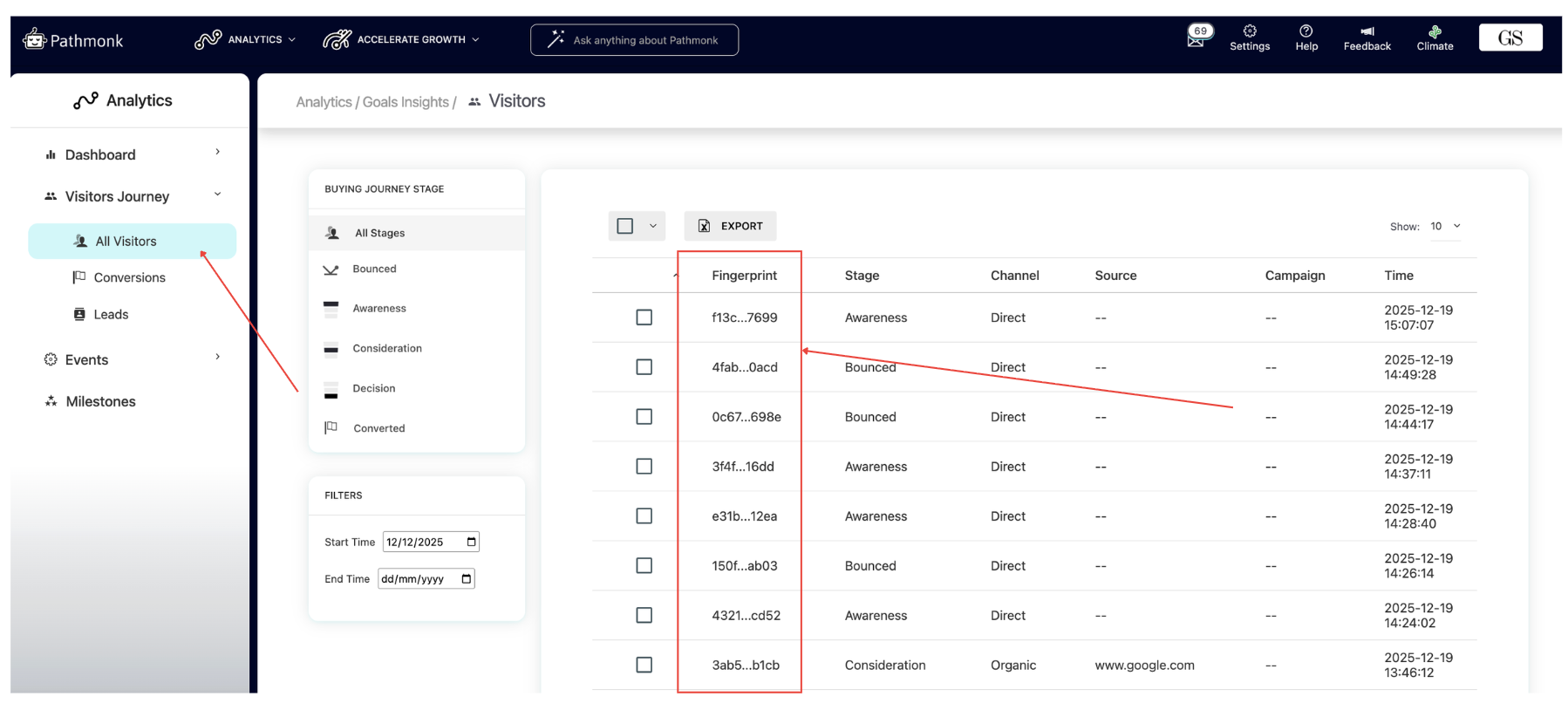
In this report, you’ll find every single website visitor, each one identified by a unique fingerprint. As you can see, every visitor is automatically assigned a journey stage (from Awareness to Conversion), including Bounced visitors.
Now, let’s click on one of the visitors:
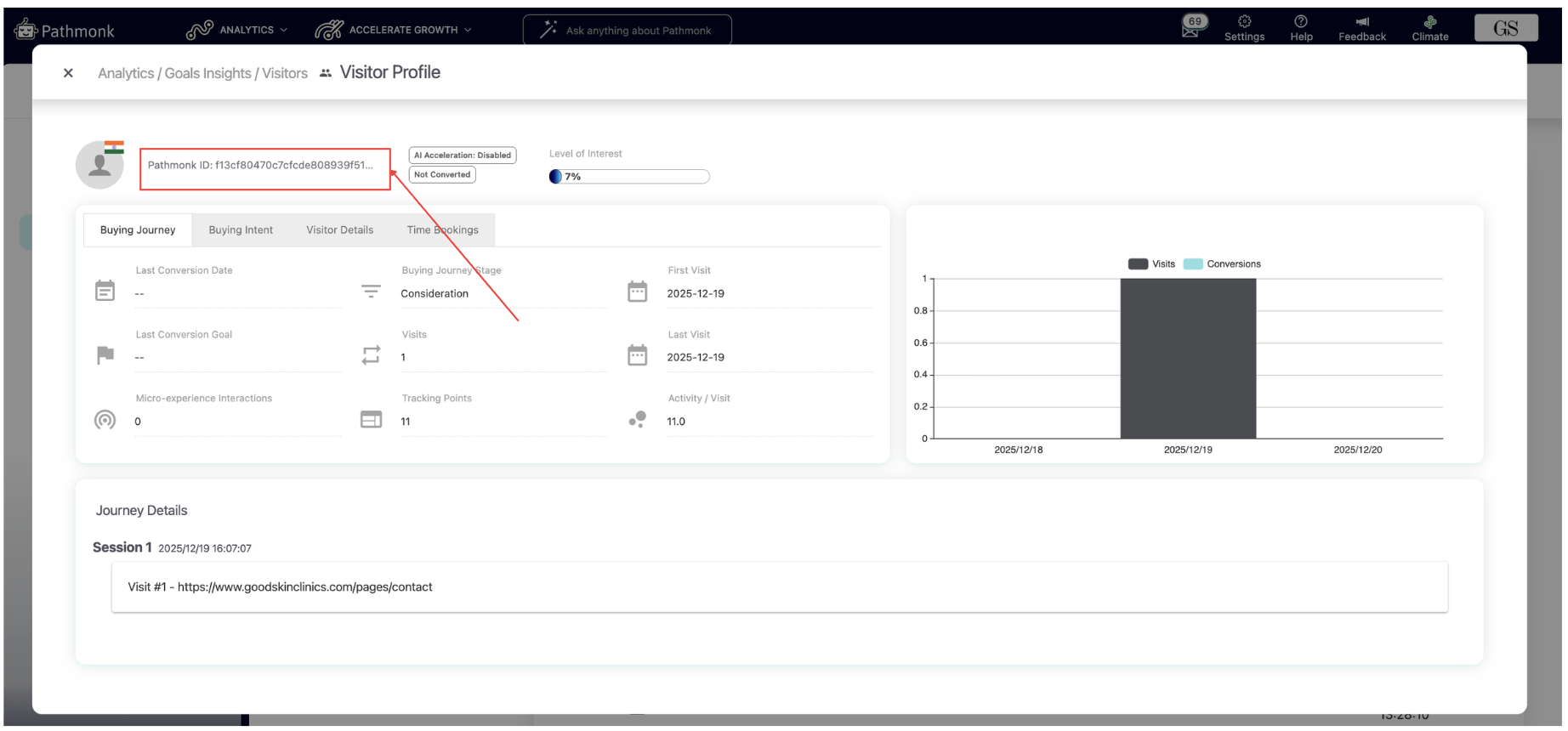
At the top of the card, you'll see the Pathmonk ID, which is the fingerprint assigned to this visitor. Regardless of whether they come back from a different device or browser, Pathmonk will try to match their new vector against the existing ones. If the system detects a high enough similarity between
both vectors, it will treat them as the same visitor and continue building their behavioral pattern.
This is what allows Pathmonk to recognize returning users even in environments where cookies don’t work, consent banners are rejected, or tracking is limited. The ID isn’t tied to personal information and doesn’t identify the person, it identifies the behavioral signature behind the session.
Advantages of Pathmonk’s fingerprint technology
Pathmonk’s vectorial fingerprinting offers several benefits compared to traditional cookie-based tracking or standard analytics:
1. Works even when cookies are blocked
Modern browsers, privacy settings, and consent banners often limit or reject cookies.
Pathmonk’s fingerprinting bypasses all of that. Identification still works regardless of cookie permissions.
2. More stable and durable than cookies
Cookies can be cleared, expire, or get overwritten. A vectorial fingerprint remains consistent across sessions as long as the visitor’s technical environment stays similar, which makes identification far more reliable.
3. Enables real-time personalization
Because Pathmonk can reliably recognize a visitor, the AI can adjust microexperiences based on actual behavior patterns, not guesses. This is essential for intent-based personalization.
4. Accurate visitor journeys
The fingerprint lets Pathmonk connect all interactions under a single ID. This avoids inflated visitor counts and gives you a true view of how users explore your site. Learn more about why Pathmonk data doesn't match other analytics sources.
5. Fully privacy-compliant
Pathmonk doesn’t need personal data or cookies to track behavior. The fingerprint represents the environment, not the individual, aligning naturally with GDPR and modern privacy expectations.
Was this article helpful?
That’s Great!
Thank you for your feedback
Sorry! We couldn't be helpful
Thank you for your feedback
Feedback sent
We appreciate your effort and will try to fix the article