The Pathmonk menu is a small navigation widget that appears on the right side of the screen on desktop and at the bottom on some mobile devices. It includes a set of tiles that let visitors quickly access key actions like learning about your company, viewing FAQs, or opening your main conversion flow.
If you prefer not to display this widget on your site, you can turn it off completely, or just on specific devices.
Hiding the menu can be helpful when:
Your site already uses a floating element (chat, support widget, booking bubble)
You want a minimal layout without fixed UI components
The menu overlaps an existing element on mobile
Your design team prefers contextual experiences only, rather than a persistent menu
It’s entirely optional — the AI will work the same with or without the menu — but since this is a helpful entry point for visitors, customers report higher conversion rates when kept enabled across all devices.
How to disable/enable by device
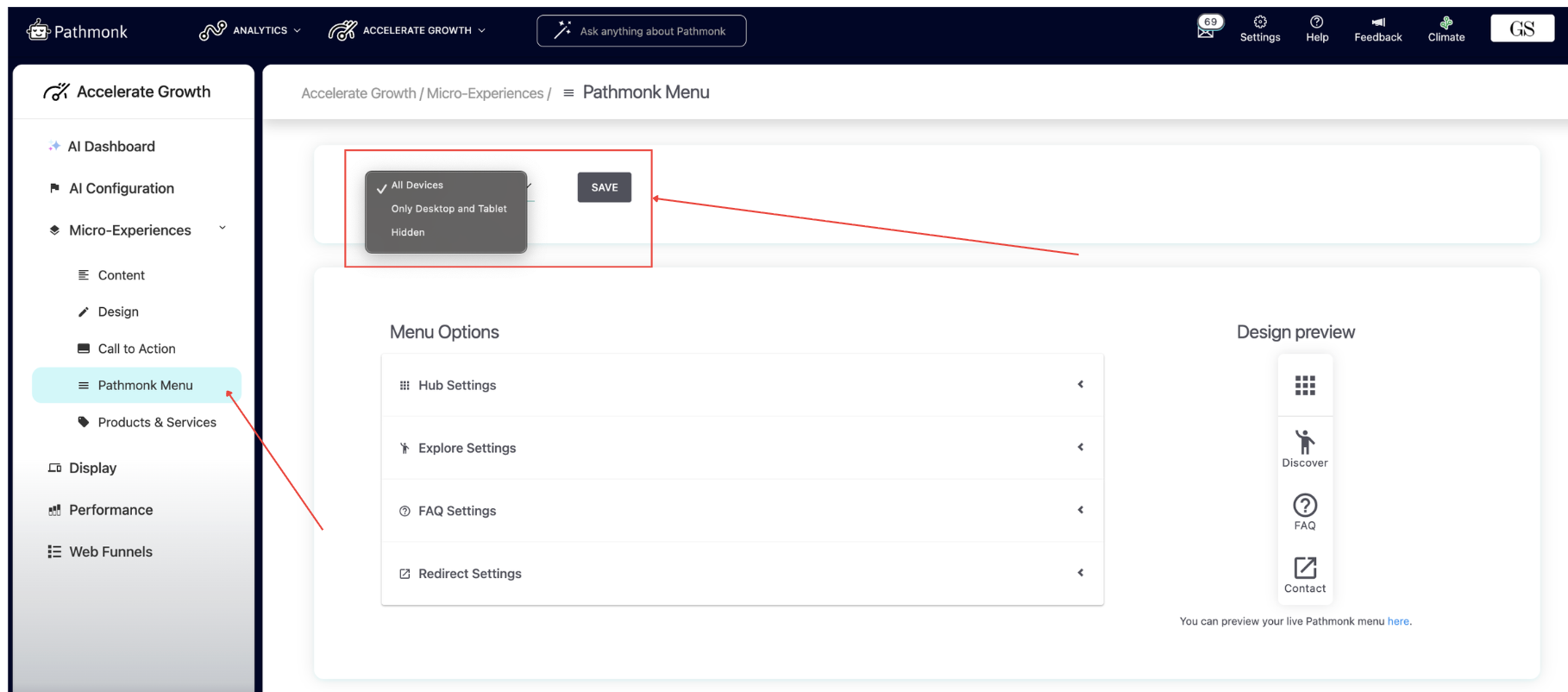
To select where to display the Pathmonk menu, go to: Accelerate Growth > Micro-Experiences > Pathmonk menu. From here, in the upper box, you can choose whether the menu appears on:
All devices
Desktop and tablet only
Or is fully hidden
This is useful if your mobile layout is tight on space or if you only want the menu visible on larger screens. You can adjust these settings at any time, and changes apply immediately.
What happens when you disable the menu
Turning off the menu only hides the widget. Everything else continues to work normally:
Micro-experiences still appear
Your A/B testing continues
Tracking remains active
Your configuration and content stay untouched
It simply removes the additional entry point for users.
Do you need more help setting the menu? Check our article on how to configure the Pathmonk menu or reach out to support@pathmonk.com.
Was this article helpful?
That’s Great!
Thank you for your feedback
Sorry! We couldn't be helpful
Thank you for your feedback
Feedback sent
We appreciate your effort and will try to fix the article